

Knowledge Objects
Knowledge Objects let you model the business entities of your domain —Employee, Invoice, Company, Ticket — as declarative YAML definitions in your project repository. On deploy, Datazone stores each definition as metadata and materializes a ClickHouse table behind it. Every row in that table is an instance, created, read, updated, and deleted through a governed REST API.
Unlike an Extract (which ingests data from an external source) or a Pipeline (which transforms datasets), a Knowledge Object is a first-class, hand-curated entity: its schema is versioned in Git, its instances are edited by users or agents, and every change is tracked.

What you get
- Declarative schema — fields, types, primary keys, defaults, and relationships defined in YAML and validated on deploy.
- A materialized table + view — each object is backed by a database table you can query in the SQL editor and join with the rest of your data.
- A CRUD API — list, create, read, update, and delete instances, with pagination, column selection, and filtering.
- Versioning — every write appends a new version; the API always serves the latest, and full history is available.
- Relationships — a field can point at another object’s instance, resolved on demand.
- Branch awareness — objects live in your repository, so they follow the same branch model as the rest of your project.
How it works
An object is a YAML file in your repository, registered inconfig.yaml, exactly like a pipeline or an endpoint:
- Create a YAML file under
objects/(e.g.objects/employee.yaml) defining the object. - Register the file in your project’s
config.yaml. - Deploy. Datazone parses the definition, stores it, and enqueues a migration that builds the ClickHouse table and view.
- Once the migration completes, the object becomes
READYand its instance API is live.
objects/employee.yaml
You can also create an object directly from the UI (or the
POST /knowledge-object/create endpoint). Datazone writes the YAML file, registers it in config.yaml, and deploys it for you — the object is still materialized by the same loader, so the outcome is identical to committing the file yourself.Core concepts
Object vs. Definition
A Knowledge Object is one identity per (project, object name) — its id is stable no matter which branch you are on. Deploying the object to a branch produces a definition for that branch, and each definition carries its own schema, migration status, and ClickHouse table/view.main. See Branching below.
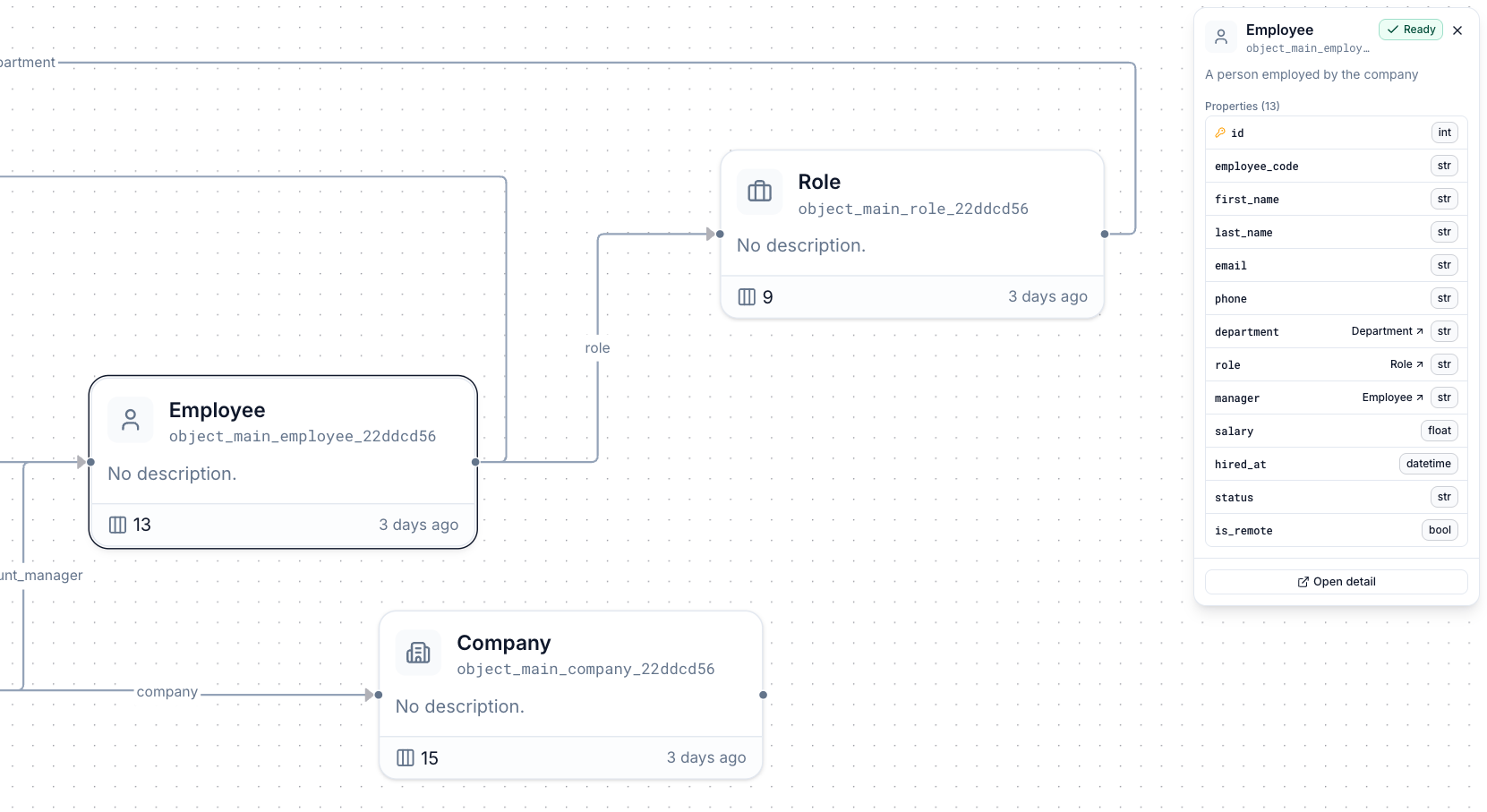
Relationships between objects form a graph you can explore visually:
Instances and the instance key
Each row is an instance, addressed by an opaque instance key (_key): a hex string derived server-side from the instance’s primary key values. The key is stable across updates — the same primary key values always map to the same _key, so an instance keeps its URL for life.
Versioning
Updates and deletes never modify a row in place; they append a new version. The API always serves the latest non-deleted version, so you can treat instances as plain mutable records — while still being able to read the full history of any instance.Branching
Because objects are stored in your repository, they follow your project’s branch model end to end:- The object identity (and its id) is shared across branches.
- Each branch has its own definition — schema, status, and a dedicated ClickHouse table (
object_<branch>_<name>), so instance data is isolated per branch. - Every API call takes an optional
branchquery parameter, defaulting tomain. The object id in the URL never changes when you switch branches — only thebranchparam does. - Object responses include a
branchesarray listing every branch the object is deployed on, which powers the branch switcher in the UI. - If an object is not deployed on the requested branch, object reads return
definition: nulland instance calls return404.
Working on a feature branch is the safe way to change an object’s schema. Deploy the change to your branch, verify the migration and instances there, then merge to
main.Next steps
- YAML Reference — every attribute you can declare on an object.
- Instance API — the full REST API for managing objects and their instances.
- Actions SDK — read and write instances from within an action.