> ## Documentation Index
> Fetch the complete documentation index at: https://docs.datazone.co/llms.txt
> Use this file to discover all available pages before exploring further.
# Quotas
> Set limits and manage resource consumption with quotas
## Overview
Quotas allow you to set limits on resource consumption in your Datazone workspace. They help prevent unexpected usage, control costs, and ensure fair resource allocation across teams and projects.
## How Quotas Work
When you create a quota for a resource type (DCU, Tokens, Storage, Query, Action), Datazone monitors your usage and takes action based on consumption levels:
### Usage Thresholds
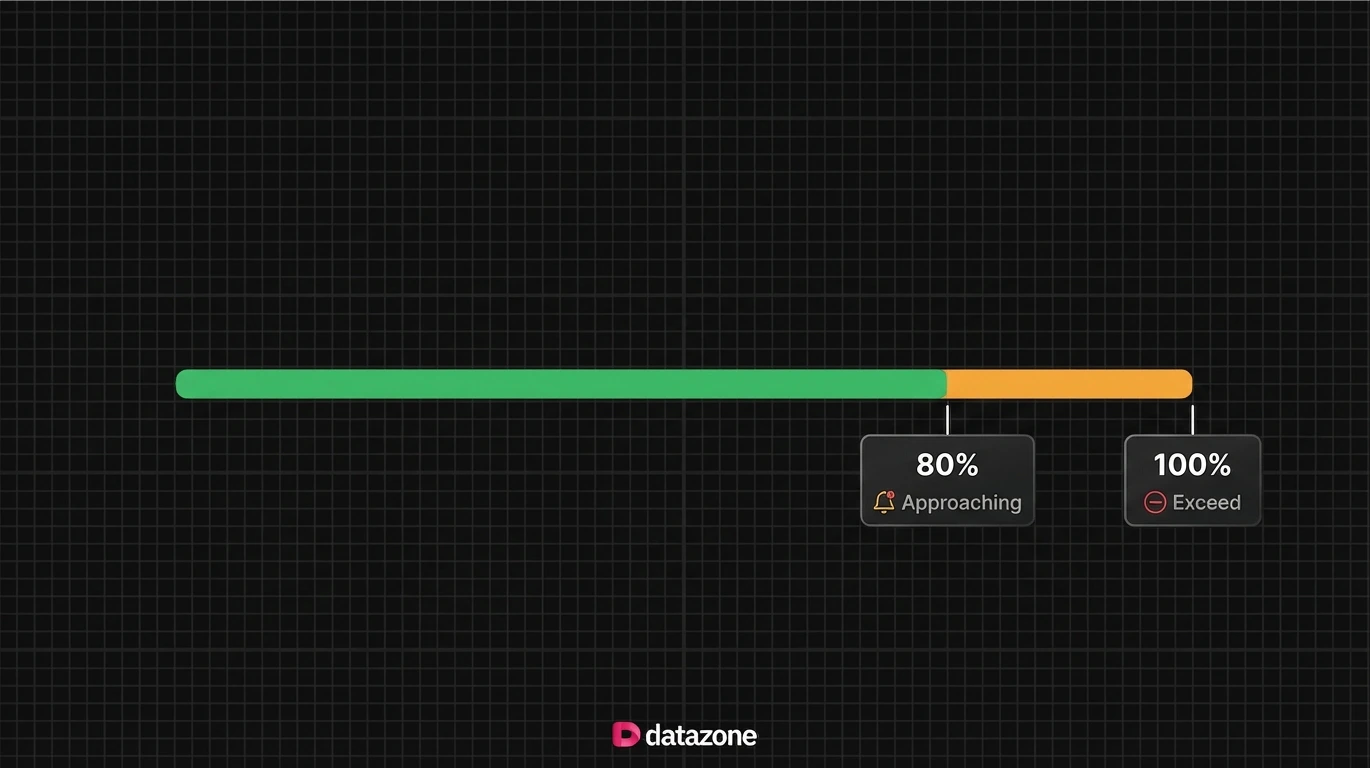 **80% - Warning Notification**
When usage reaches 80% of the quota limit, you receive an email notification alerting you that you're approaching the limit.
**100% - Service Pause**
When usage exceeds the quota limit, your services are automatically paused to prevent further consumption. You'll need to either increase the quota or reduce usage to resume operations.
## Setting Up Quotas
When you create a quota, you choose a **resource type**, a **scope**, and a **limit**. The scope determines how broadly the limit is enforced — across the whole organisation, within a single project, per user, or for a specific parent entity such as an intelligent app or agent.
**80% - Warning Notification**
When usage reaches 80% of the quota limit, you receive an email notification alerting you that you're approaching the limit.
**100% - Service Pause**
When usage exceeds the quota limit, your services are automatically paused to prevent further consumption. You'll need to either increase the quota or reduce usage to resume operations.
## Setting Up Quotas
When you create a quota, you choose a **resource type**, a **scope**, and a **limit**. The scope determines how broadly the limit is enforced — across the whole organisation, within a single project, per user, or for a specific parent entity such as an intelligent app or agent.
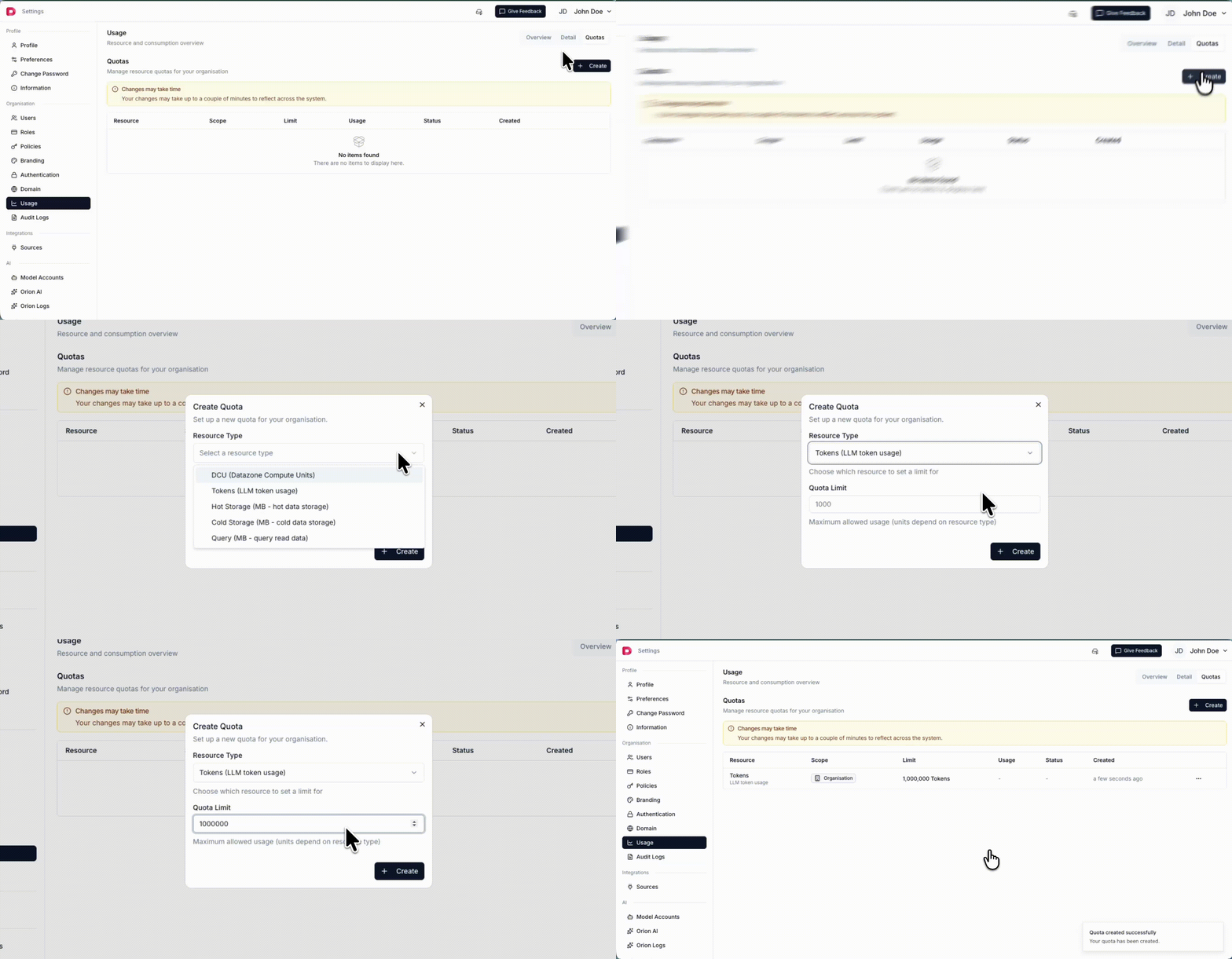 ### Scopes
A scope defines the boundary that a quota is measured and enforced against. Datazone supports the following scopes:
* **Organisation** - Applies the quota to the whole organisation. Usage is aggregated across every project, user, and app.
* **Project** - Limits usage only within a single project. You select the target project when creating the quota.
* **User** - Each user gets their own usage limit for the resource.
* **Parent Entity** - Limits usage for a specific app or agent (for example, an intelligent app or a single agent).
Not every resource supports every scope. The table below shows which scopes are available for each resource type:
| Resource | Organisation | Project | User | Parent Entity (App / Agent) |
| ---------------- | :----------: | :-----: | :--: | :-------------------------: |
| **Hot Storage** | ✅ | ✅ | — | — |
| **Cold Storage** | ✅ | ✅ | — | — |
| **DCU** | ✅ | ✅ | — | — |
| **Query** | ✅ | ✅ | ✅ | — |
| **Action** | ✅ | ✅ | ✅ | — |
| **Tokens** | ✅ | ✅ | ✅ | ✅ |
**Tokens** are the most flexible resource — they can be scoped all the way down to an intelligent app or an individual agent, in addition to organisation, project, and user levels.
#### Example: Project-scoped token limit
To cap LLM token consumption for a single project, choose the **Tokens** resource type, select the **Project** scope, pick the target project, and set a quota limit:
### Scopes
A scope defines the boundary that a quota is measured and enforced against. Datazone supports the following scopes:
* **Organisation** - Applies the quota to the whole organisation. Usage is aggregated across every project, user, and app.
* **Project** - Limits usage only within a single project. You select the target project when creating the quota.
* **User** - Each user gets their own usage limit for the resource.
* **Parent Entity** - Limits usage for a specific app or agent (for example, an intelligent app or a single agent).
Not every resource supports every scope. The table below shows which scopes are available for each resource type:
| Resource | Organisation | Project | User | Parent Entity (App / Agent) |
| ---------------- | :----------: | :-----: | :--: | :-------------------------: |
| **Hot Storage** | ✅ | ✅ | — | — |
| **Cold Storage** | ✅ | ✅ | — | — |
| **DCU** | ✅ | ✅ | — | — |
| **Query** | ✅ | ✅ | ✅ | — |
| **Action** | ✅ | ✅ | ✅ | — |
| **Tokens** | ✅ | ✅ | ✅ | ✅ |
**Tokens** are the most flexible resource — they can be scoped all the way down to an intelligent app or an individual agent, in addition to organisation, project, and user levels.
#### Example: Project-scoped token limit
To cap LLM token consumption for a single project, choose the **Tokens** resource type, select the **Project** scope, pick the target project, and set a quota limit:
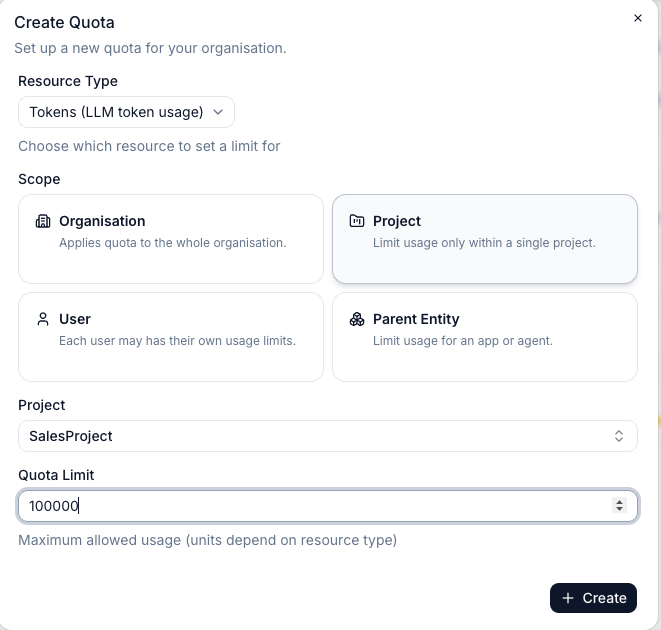 In this example, the `SalesProject` project is limited to 100,000 tokens. Usage in other projects is unaffected by this quota.
### Supported Resources
You can set quotas for any of the following [resource types](/reference/platform/resources/overview):
* **DCU** - Datazone Compute Units (compute time)
* **TOKENS** - LLM token consumption
* **HOT\_STORAGE** - Relational database storage (MB)
* **COLD\_STORAGE** - Lakehouse/object storage (MB)
* **QUERY** - Total data scanned by queries (MB)
* **ACTION** - Number of action function executions
In this example, the `SalesProject` project is limited to 100,000 tokens. Usage in other projects is unaffected by this quota.
### Supported Resources
You can set quotas for any of the following [resource types](/reference/platform/resources/overview):
* **DCU** - Datazone Compute Units (compute time)
* **TOKENS** - LLM token consumption
* **HOT\_STORAGE** - Relational database storage (MB)
* **COLD\_STORAGE** - Lakehouse/object storage (MB)
* **QUERY** - Total data scanned by queries (MB)
* **ACTION** - Number of action function executions