> ## Documentation Index
> Fetch the complete documentation index at: https://docs.datazone.co/llms.txt
> Use this file to discover all available pages before exploring further.
# Orion AI (LLM Assistant)
> Overview of Orion AI, the LLM-powered assistant for Intelligent Apps.
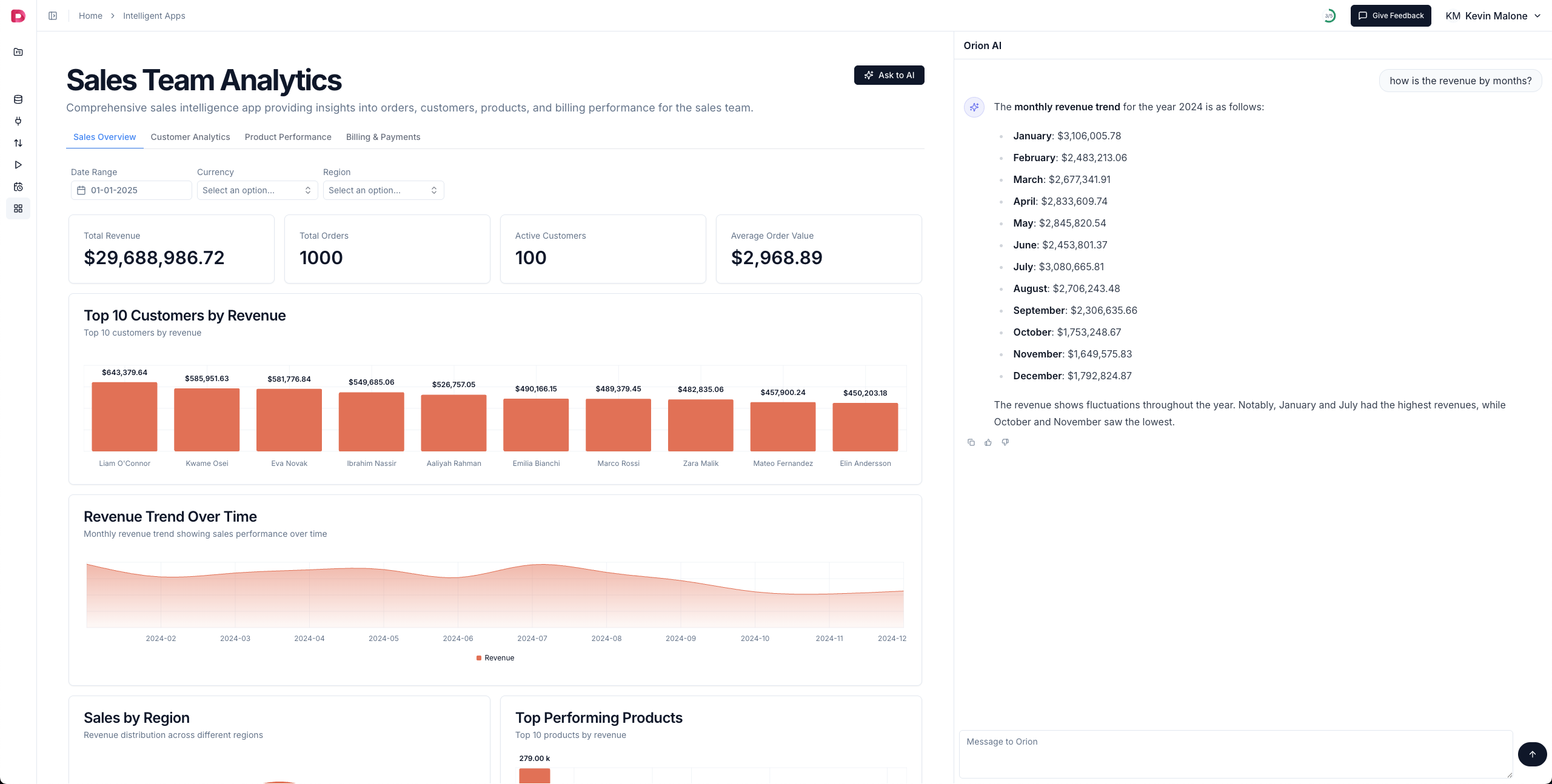
Orion AI is an advanced Large Language Model (LLM) assistant integrated into Datazone's Intelligent Apps. It enables users to ask natural language questions about their dashboards and data, making analytics more accessible and interactive for everyone—no SQL or technical expertise required.
## What is Orion AI?
Orion AI is a chatbot assistant that leverages state-of-the-art LLMs (such as GPT-4O and Claude) to help you:
* **Understand your dashboards**: Ask questions about any chart, metric, or filter in your Intelligent App.
* **Perform data analysis**: Get instant insights, summaries, and explanations about your data.
* **Discover trends and anomalies**: Let Orion AI highlight important changes or outliers in your data.
* **Learn how to use the platform**: Ask for help with features, navigation, or best practices.
Orion AI is always context-aware. When you use it on an Intelligent App page, it automatically receives the app's metadata and configuration, so its answers are tailored to your current dashboard and data context.
 ## Why Use Orion AI?
* **No technical skills required**: Anyone can ask questions in plain English (or other supported languages).
* **Faster insights**: Skip manual exploration—just ask Orion AI for what you need.
* **Guided analysis**: Orion can suggest next steps, deeper dives, or related metrics to explore.
* **Customizable behavior**: App creators can set custom instructions for Orion AI using the `llm_instruction` field in the app's YAML config, tailoring the assistant's tone and focus for each dashboard.
## How It Works
* On any Intelligent App, look for the Orion AI chat interface.
* Type your question (e.g., "What is the sales trend for the last quarter?" or "Why did revenue drop in March?").
* Orion AI will analyze your app's metadata, charts, and filters, and respond with a relevant, data-driven answer.
* If the app creator has provided a custom instruction (via `llm_instruction`), Orion will follow those guidelines in its responses.
## Customizing Orion AI
To customize Orion's behavior for your app, set the `llm_instruction` field in your YAML config:
```yaml theme={null}
config:
llm_instruction: "You are a helpful assistant for sales analytics. Always explain trends simply."
```
## Configuration Options
In addition to `llm_instruction`, you can also use these optional config options:
* `hide_llm`: (Optional) Hide the LLM assistant (Orion AI) in the app UI
* `hide_insights`: (Optional) Hide the Insights panel in the app UI
***
Orion AI makes data analysis conversational, intuitive, and accessible—empowering every user to get more from their data.
## Why Use Orion AI?
* **No technical skills required**: Anyone can ask questions in plain English (or other supported languages).
* **Faster insights**: Skip manual exploration—just ask Orion AI for what you need.
* **Guided analysis**: Orion can suggest next steps, deeper dives, or related metrics to explore.
* **Customizable behavior**: App creators can set custom instructions for Orion AI using the `llm_instruction` field in the app's YAML config, tailoring the assistant's tone and focus for each dashboard.
## How It Works
* On any Intelligent App, look for the Orion AI chat interface.
* Type your question (e.g., "What is the sales trend for the last quarter?" or "Why did revenue drop in March?").
* Orion AI will analyze your app's metadata, charts, and filters, and respond with a relevant, data-driven answer.
* If the app creator has provided a custom instruction (via `llm_instruction`), Orion will follow those guidelines in its responses.
## Customizing Orion AI
To customize Orion's behavior for your app, set the `llm_instruction` field in your YAML config:
```yaml theme={null}
config:
llm_instruction: "You are a helpful assistant for sales analytics. Always explain trends simply."
```
## Configuration Options
In addition to `llm_instruction`, you can also use these optional config options:
* `hide_llm`: (Optional) Hide the LLM assistant (Orion AI) in the app UI
* `hide_insights`: (Optional) Hide the Insights panel in the app UI
***
Orion AI makes data analysis conversational, intuitive, and accessible—empowering every user to get more from their data.