> ## Documentation Index
> Fetch the complete documentation index at: https://docs.datazone.co/llms.txt
> Use this file to discover all available pages before exploring further.
# Endpoints
> Create custom API endpoints for secure data access
 ## Overview
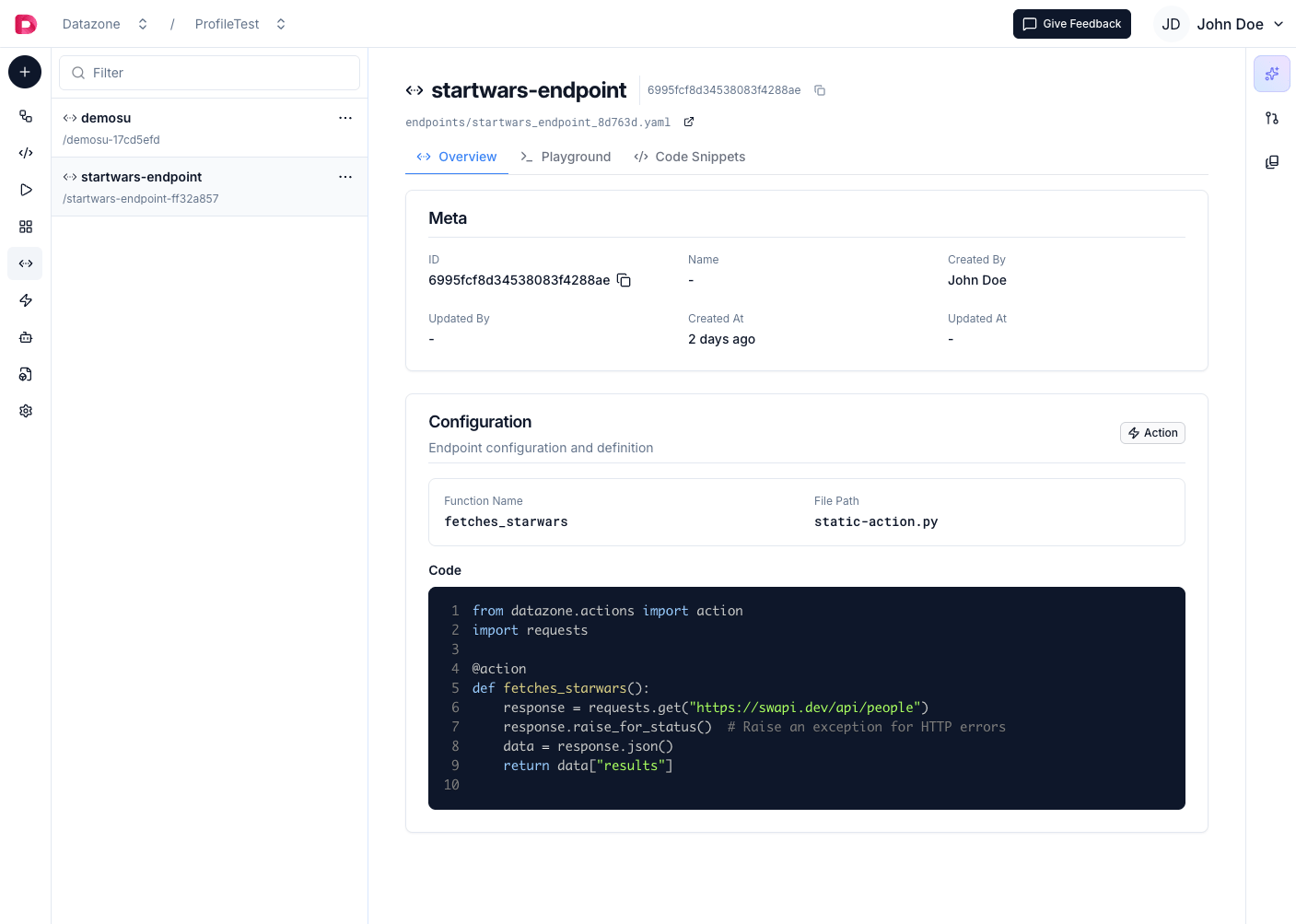
Endpoints allow you to create **custom API interfaces** with **secure, controlled access**. You can define **three types of endpoints**:
1. **Query Endpoints** - Execute **SQL queries** on your datasets with **dynamic filters**
2. **Action Endpoints** - Execute **serverless Python functions** for custom logic
3. **Vector Endpoints** - Perform **semantic similarity search** on vectorized data
## Overview
Endpoints allow you to create **custom API interfaces** with **secure, controlled access**. You can define **three types of endpoints**:
1. **Query Endpoints** - Execute **SQL queries** on your datasets with **dynamic filters**
2. **Action Endpoints** - Execute **serverless Python functions** for custom logic
3. **Vector Endpoints** - Perform **semantic similarity search** on vectorized data
 ## Creating Endpoints
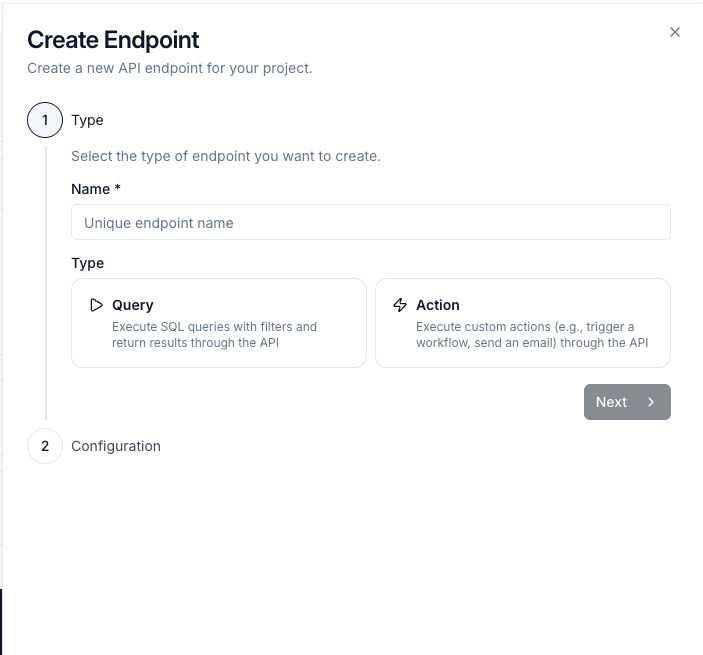
1. Navigate to your **Project**
2. Create a new **YAML file** for your endpoint (e.g., `api-orders.yaml`)
3. Define your endpoint configuration
4. Reference it in your **`config.yaml`** file
## Creating Endpoints
1. Navigate to your **Project**
2. Create a new **YAML file** for your endpoint (e.g., `api-orders.yaml`)
3. Define your endpoint configuration
4. Reference it in your **`config.yaml`** file
 ## Endpoint Types
Although the YAML syntax uses an `endpoints:` array, **only one endpoint definition per file is supported**. Defining multiple entries in a single file will result in an error. Use a separate YAML file for each endpoint and register each file individually in `config.yaml`.
### Query-Based Endpoints
Query endpoints execute **SQL queries** on your data with **dynamic filtering** using Jinja templating.
**Example YAML Configuration:**
```yaml theme={null}
endpoints:
- name: consolidated-sales-endpoint
type: query
config:
filters:
- name: country
type: string
optional: true
- name: city
type: string
optional: true
query: |
SELECT *
FROM consolidated_sales_df_299ceb
WHERE 1 = 1
{% if country is defined %}
AND CustomerCountry = '{{ country }}'
{% endif %}
{% if city is defined %}
AND CustomerCity = '{{ city }}'
{% endif %}
```
### Action-Based Endpoints
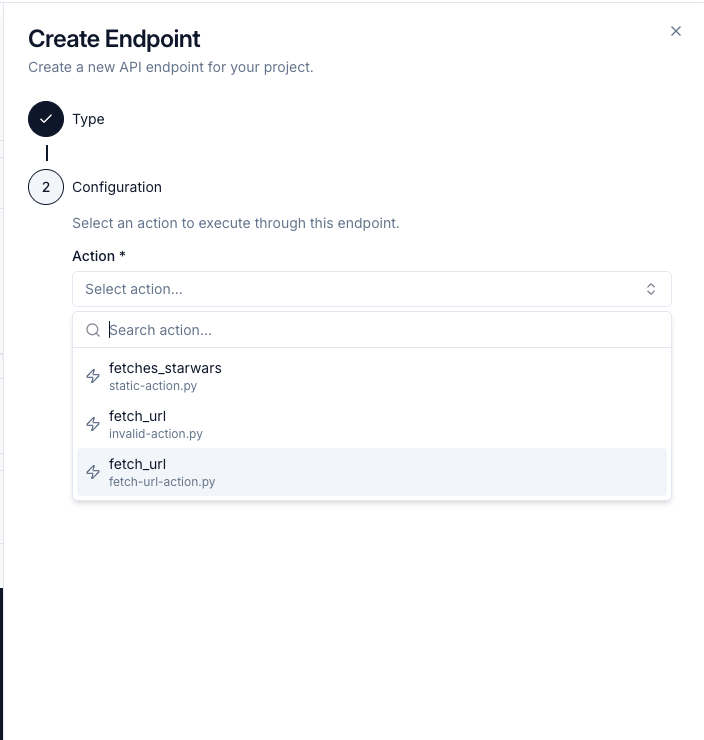
Action endpoints **execute serverless Python functions** when called. Perfect for sending notifications, processing data, calling external APIs, or automating workflows.
**Example YAML Configuration:**
```yaml theme={null}
endpoints:
- name: process-data-endpoint
type: action
config:
action_id: "507f1f77bcf86cd799439011"
```
The `action_id` references an action function in your project. Get the ID from your action details page.
The action function must **return a list**. Returning any other type raises `ActionEndpointResultMustBeListError`.
### Vector-Based Endpoints
Vector endpoints enable **semantic similarity search** on your vectorized data via HTTP API. Perfect for building search features, recommendation systems, or RAG applications.
**Example YAML Configuration:**
```yaml theme={null}
endpoints:
- name: document-search-endpoint
type: vector
config:
vector_id: "69d597a6e9713d78370a50d9"
```
The `vector_id` references a [Vector](/reference/development/vectors) in your project. Get the ID from your vector details page.
### Register in config.yaml
Reference your endpoint file in **`config.yaml`**:
```yaml theme={null}
project_name: TestProject
project_id: 688b3d0b7c5f93f0763a028c
endpoints:
- path: api-orders.yaml
```
Learn more about the configuration file in the [Project Configuration](/reference/development/project#configuration-file) section.
## Configuration Reference
### Common Attributes
| Attribute | Type | Required | Description |
| --------- | ------ | -------- | ------------------------------------------------- |
| `name` | string | Yes | **Unique endpoint identifier** |
| `type` | string | Yes | **Endpoint type**: `query`, `action`, or `vector` |
| `config` | object | Yes | **Type-specific configuration** |
### Query Config Attributes
| Attribute | Type | Required | Description |
| --------- | ------ | -------- | ----------------------------------- |
| `query` | string | Yes | **SQL query** with Jinja templating |
| `filters` | array | No | **List of filter parameters** |
### Action Config Attributes
| Attribute | Type | Required | Description |
| ----------- | ------ | -------- | --------------------------------- |
| `action_id` | string | Yes | **Action function ID** to execute |
### Vector Config Attributes
| Attribute | Type | Required | Description |
| ----------- | ------ | -------- | ----------------------------------- |
| `vector_id` | string | Yes | **Vector ID** for similarity search |
### Filter Configuration
Filters are **only for query endpoints** and define dynamic parameters:
| Attribute | Type | Required | Description |
| ---------- | ------- | -------- | ------------------------------------------------ |
| `name` | string | Yes | **Filter parameter name** (alphanumeric, -, \_) |
| `type` | string | Yes | **Data type** (see types below) |
| `optional` | boolean | No | Whether filter is **optional** (default: `true`) |
### Filter Types
| Type | Description | Example Usage |
| ---------- | ------------------------- | -------------------------- |
| `string` | **Text parameter** | `country`, `category` |
| `integer` | **Numeric parameter** | `year`, `limit` |
| `float` | **Decimal parameter** | `price`, `rating` |
| `date` | **Date parameter** | `start_date`, `end_date` |
| `datetime` | **DateTime parameter** | `created_at`, `updated_at` |
| `boolean` | **Boolean parameter** | `active`, `is_featured` |
| `enum` | **Enumeration parameter** | `status`, `priority` |
## Using Endpoints
Endpoints are accessible via **HTTP requests**. Query and vector endpoints use **GET requests**, while action endpoints may vary based on implementation:
```bash cURL theme={null}
curl -X GET \
"https://app.datazone.co/api/v1/endpoint/your-endpoint-name?param1=value1¶m2=value2" \
-H "x-api-key: " \
-H "Content-Type: application/json"
```
```python Python theme={null}
import requests
url = "https://app.datazone.co/api/v1/endpoint/your-endpoint-name"
headers = {
"x-api-key": "",
"Content-Type": "application/json"
}
params = {
"param1": "value1",
"param2": "value2"
}
response = requests.get(url, headers=headers, params=params)
data = response.json()
print(data)
```
```javascript JavaScript theme={null}
const url = 'https://app.datazone.co/api/v1/endpoint/your-endpoint-name';
const params = new URLSearchParams({
param1: 'value1',
param2: 'value2'
});
const response = await fetch(`${url}?${params}`, {
method: 'GET',
headers: {
'x-api-key': '',
'Content-Type': 'application/json'
}
});
const data = await response.json();
console.log(data);
```
```java Java theme={null}
import java.net.http.HttpClient;
import java.net.http.HttpRequest;
import java.net.http.HttpResponse;
import java.net.URI;
HttpClient client = HttpClient.newHttpClient();
String url = "https://app.datazone.co/api/v1/endpoint/your-endpoint-name?param1=value1¶m2=value2";
HttpRequest request = HttpRequest.newBuilder()
.uri(URI.create(url))
.header("x-api-key", "")
.header("Content-Type", "application/json")
.GET()
.build();
HttpResponse response = client.send(request, HttpResponse.BodyHandlers.ofString());
System.out.println(response.body());
```
## Response Format
### Query Endpoint Response
Query endpoints return **JSON data** with query results:
```json theme={null}
{
"records": [
{
"column1": "value1",
"column2": "value2"
}
],
"metadata": {
"total_records": 100,
"query_time_ms": 250,
"endpoint_name": "consolidated-sales-endpoint"
}
}
```
### Action Endpoint Response
Action endpoints return the **list** your Python function returns:
```json theme={null}
[
{
"status": "success",
"message": "Action executed successfully"
}
]
```
Your action function **must return a list**. Returning any other type (dict, string, `None`, etc.) raises `ActionEndpointResultMustBeListError`. Always wrap your result in a list, even when there is only one item.
```python theme={null}
# ✅ Correct — return a list
def run(context):
return [{"status": "success", "message": "Done"}]
# ❌ Wrong — raises ActionEndpointResultMustBeListError
def run(context):
return {"status": "success", "message": "Done"}
```
### Vector Endpoint Response
Vector endpoints return **semantically similar results** based on your search query:
```json theme={null}
{
"results": [
{
"content": "Relevant text chunk from your data...",
"metadata": {
"source": "document.pdf",
"page": 5,
"chunk_id": "abc123"
},
"score": 0.92
},
{
"content": "Another relevant text chunk...",
"metadata": {
"source": "report.docx",
"section": "Introduction"
},
"score": 0.87
}
],
"metadata": {
"vector_id": "69d597a6e9713d78370a50d9",
"endpoint_name": "document-search-endpoint",
"query": "what is the company revenue?",
"total_results": 10
}
}
```
**Using Vector Endpoints:**
```bash cURL theme={null}
curl -X GET \
"https://app.datazone.co/api/v1/endpoint/document-search-endpoint?query=what+is+the+company+revenue" \
-H "x-api-key: " \
-H "Content-Type: application/json"
```
```python Python theme={null}
import requests
url = "https://app.datazone.co/api/v1/endpoint/document-search-endpoint"
headers = {
"x-api-key": "",
"Content-Type": "application/json"
}
params = {
"query": "what is the company revenue?"
}
response = requests.get(url, headers=headers, params=params)
results = response.json()
for result in results["results"]:
print(f"Score: {result['score']}")
print(f"Content: {result['content']}")
print(f"Metadata: {result['metadata']}\n")
```
**Query Parameters for Vector Endpoints:**
| Parameter | Type | Required | Description |
| --------- | ------ | -------- | ------------------------------------ |
| `query` | string | Yes | **Search query** in natural language |
### Authentication
Endpoints use API key authentication via the `x-api-key` header:
```bash theme={null}
-H "x-api-key: YOUR_API_KEY"
```
### Error Responses
| Status Code | Description |
| ----------- | ---------------------------------- |
| 200 | Success |
| 400 | Bad Request - Invalid parameters |
| 401 | Unauthorized - Invalid API key |
| 403 | Forbidden - Access denied |
| 404 | Not Found - Endpoint doesn't exist |
| 500 | Internal Server Error |
Example error response:
```json theme={null}
{
"error": "Invalid parameter 'country': must be a string",
"code": "INVALID_PARAMETER",
"status": 400
}
```
### Advanced Query Features
#### Jinja Templating
Endpoints support Jinja templating for dynamic queries:
```yaml theme={null}
query: |
SELECT *
FROM sales_data
WHERE 1 = 1
{% if start_date is defined %}
AND order_date >= '{{ start_date }}'
{% endif %}
{% if end_date is defined %}
AND order_date <= '{{ end_date }}'
{% endif %}
{% if categories is defined %}
AND category IN ({{ categories | join("','") | surround("'") }})
{% endif %}
```
### Caching
Endpoint responses can be cached:
* Default cache TTL: 60 minutes
* Cache headers indicate freshness
* Use cache-busting parameters when needed
## Endpoint Types
Although the YAML syntax uses an `endpoints:` array, **only one endpoint definition per file is supported**. Defining multiple entries in a single file will result in an error. Use a separate YAML file for each endpoint and register each file individually in `config.yaml`.
### Query-Based Endpoints
Query endpoints execute **SQL queries** on your data with **dynamic filtering** using Jinja templating.
**Example YAML Configuration:**
```yaml theme={null}
endpoints:
- name: consolidated-sales-endpoint
type: query
config:
filters:
- name: country
type: string
optional: true
- name: city
type: string
optional: true
query: |
SELECT *
FROM consolidated_sales_df_299ceb
WHERE 1 = 1
{% if country is defined %}
AND CustomerCountry = '{{ country }}'
{% endif %}
{% if city is defined %}
AND CustomerCity = '{{ city }}'
{% endif %}
```
### Action-Based Endpoints
Action endpoints **execute serverless Python functions** when called. Perfect for sending notifications, processing data, calling external APIs, or automating workflows.
**Example YAML Configuration:**
```yaml theme={null}
endpoints:
- name: process-data-endpoint
type: action
config:
action_id: "507f1f77bcf86cd799439011"
```
The `action_id` references an action function in your project. Get the ID from your action details page.
The action function must **return a list**. Returning any other type raises `ActionEndpointResultMustBeListError`.
### Vector-Based Endpoints
Vector endpoints enable **semantic similarity search** on your vectorized data via HTTP API. Perfect for building search features, recommendation systems, or RAG applications.
**Example YAML Configuration:**
```yaml theme={null}
endpoints:
- name: document-search-endpoint
type: vector
config:
vector_id: "69d597a6e9713d78370a50d9"
```
The `vector_id` references a [Vector](/reference/development/vectors) in your project. Get the ID from your vector details page.
### Register in config.yaml
Reference your endpoint file in **`config.yaml`**:
```yaml theme={null}
project_name: TestProject
project_id: 688b3d0b7c5f93f0763a028c
endpoints:
- path: api-orders.yaml
```
Learn more about the configuration file in the [Project Configuration](/reference/development/project#configuration-file) section.
## Configuration Reference
### Common Attributes
| Attribute | Type | Required | Description |
| --------- | ------ | -------- | ------------------------------------------------- |
| `name` | string | Yes | **Unique endpoint identifier** |
| `type` | string | Yes | **Endpoint type**: `query`, `action`, or `vector` |
| `config` | object | Yes | **Type-specific configuration** |
### Query Config Attributes
| Attribute | Type | Required | Description |
| --------- | ------ | -------- | ----------------------------------- |
| `query` | string | Yes | **SQL query** with Jinja templating |
| `filters` | array | No | **List of filter parameters** |
### Action Config Attributes
| Attribute | Type | Required | Description |
| ----------- | ------ | -------- | --------------------------------- |
| `action_id` | string | Yes | **Action function ID** to execute |
### Vector Config Attributes
| Attribute | Type | Required | Description |
| ----------- | ------ | -------- | ----------------------------------- |
| `vector_id` | string | Yes | **Vector ID** for similarity search |
### Filter Configuration
Filters are **only for query endpoints** and define dynamic parameters:
| Attribute | Type | Required | Description |
| ---------- | ------- | -------- | ------------------------------------------------ |
| `name` | string | Yes | **Filter parameter name** (alphanumeric, -, \_) |
| `type` | string | Yes | **Data type** (see types below) |
| `optional` | boolean | No | Whether filter is **optional** (default: `true`) |
### Filter Types
| Type | Description | Example Usage |
| ---------- | ------------------------- | -------------------------- |
| `string` | **Text parameter** | `country`, `category` |
| `integer` | **Numeric parameter** | `year`, `limit` |
| `float` | **Decimal parameter** | `price`, `rating` |
| `date` | **Date parameter** | `start_date`, `end_date` |
| `datetime` | **DateTime parameter** | `created_at`, `updated_at` |
| `boolean` | **Boolean parameter** | `active`, `is_featured` |
| `enum` | **Enumeration parameter** | `status`, `priority` |
## Using Endpoints
Endpoints are accessible via **HTTP requests**. Query and vector endpoints use **GET requests**, while action endpoints may vary based on implementation:
```bash cURL theme={null}
curl -X GET \
"https://app.datazone.co/api/v1/endpoint/your-endpoint-name?param1=value1¶m2=value2" \
-H "x-api-key: " \
-H "Content-Type: application/json"
```
```python Python theme={null}
import requests
url = "https://app.datazone.co/api/v1/endpoint/your-endpoint-name"
headers = {
"x-api-key": "",
"Content-Type": "application/json"
}
params = {
"param1": "value1",
"param2": "value2"
}
response = requests.get(url, headers=headers, params=params)
data = response.json()
print(data)
```
```javascript JavaScript theme={null}
const url = 'https://app.datazone.co/api/v1/endpoint/your-endpoint-name';
const params = new URLSearchParams({
param1: 'value1',
param2: 'value2'
});
const response = await fetch(`${url}?${params}`, {
method: 'GET',
headers: {
'x-api-key': '',
'Content-Type': 'application/json'
}
});
const data = await response.json();
console.log(data);
```
```java Java theme={null}
import java.net.http.HttpClient;
import java.net.http.HttpRequest;
import java.net.http.HttpResponse;
import java.net.URI;
HttpClient client = HttpClient.newHttpClient();
String url = "https://app.datazone.co/api/v1/endpoint/your-endpoint-name?param1=value1¶m2=value2";
HttpRequest request = HttpRequest.newBuilder()
.uri(URI.create(url))
.header("x-api-key", "")
.header("Content-Type", "application/json")
.GET()
.build();
HttpResponse response = client.send(request, HttpResponse.BodyHandlers.ofString());
System.out.println(response.body());
```
## Response Format
### Query Endpoint Response
Query endpoints return **JSON data** with query results:
```json theme={null}
{
"records": [
{
"column1": "value1",
"column2": "value2"
}
],
"metadata": {
"total_records": 100,
"query_time_ms": 250,
"endpoint_name": "consolidated-sales-endpoint"
}
}
```
### Action Endpoint Response
Action endpoints return the **list** your Python function returns:
```json theme={null}
[
{
"status": "success",
"message": "Action executed successfully"
}
]
```
Your action function **must return a list**. Returning any other type (dict, string, `None`, etc.) raises `ActionEndpointResultMustBeListError`. Always wrap your result in a list, even when there is only one item.
```python theme={null}
# ✅ Correct — return a list
def run(context):
return [{"status": "success", "message": "Done"}]
# ❌ Wrong — raises ActionEndpointResultMustBeListError
def run(context):
return {"status": "success", "message": "Done"}
```
### Vector Endpoint Response
Vector endpoints return **semantically similar results** based on your search query:
```json theme={null}
{
"results": [
{
"content": "Relevant text chunk from your data...",
"metadata": {
"source": "document.pdf",
"page": 5,
"chunk_id": "abc123"
},
"score": 0.92
},
{
"content": "Another relevant text chunk...",
"metadata": {
"source": "report.docx",
"section": "Introduction"
},
"score": 0.87
}
],
"metadata": {
"vector_id": "69d597a6e9713d78370a50d9",
"endpoint_name": "document-search-endpoint",
"query": "what is the company revenue?",
"total_results": 10
}
}
```
**Using Vector Endpoints:**
```bash cURL theme={null}
curl -X GET \
"https://app.datazone.co/api/v1/endpoint/document-search-endpoint?query=what+is+the+company+revenue" \
-H "x-api-key: " \
-H "Content-Type: application/json"
```
```python Python theme={null}
import requests
url = "https://app.datazone.co/api/v1/endpoint/document-search-endpoint"
headers = {
"x-api-key": "",
"Content-Type": "application/json"
}
params = {
"query": "what is the company revenue?"
}
response = requests.get(url, headers=headers, params=params)
results = response.json()
for result in results["results"]:
print(f"Score: {result['score']}")
print(f"Content: {result['content']}")
print(f"Metadata: {result['metadata']}\n")
```
**Query Parameters for Vector Endpoints:**
| Parameter | Type | Required | Description |
| --------- | ------ | -------- | ------------------------------------ |
| `query` | string | Yes | **Search query** in natural language |
### Authentication
Endpoints use API key authentication via the `x-api-key` header:
```bash theme={null}
-H "x-api-key: YOUR_API_KEY"
```
### Error Responses
| Status Code | Description |
| ----------- | ---------------------------------- |
| 200 | Success |
| 400 | Bad Request - Invalid parameters |
| 401 | Unauthorized - Invalid API key |
| 403 | Forbidden - Access denied |
| 404 | Not Found - Endpoint doesn't exist |
| 500 | Internal Server Error |
Example error response:
```json theme={null}
{
"error": "Invalid parameter 'country': must be a string",
"code": "INVALID_PARAMETER",
"status": 400
}
```
### Advanced Query Features
#### Jinja Templating
Endpoints support Jinja templating for dynamic queries:
```yaml theme={null}
query: |
SELECT *
FROM sales_data
WHERE 1 = 1
{% if start_date is defined %}
AND order_date >= '{{ start_date }}'
{% endif %}
{% if end_date is defined %}
AND order_date <= '{{ end_date }}'
{% endif %}
{% if categories is defined %}
AND category IN ({{ categories | join("','") | surround("'") }})
{% endif %}
```
### Caching
Endpoint responses can be cached:
* Default cache TTL: 60 minutes
* Cache headers indicate freshness
* Use cache-busting parameters when needed